
Get a Customized Solution for Your IT Needs
+91 702-705-8777
info@pansofic.com
55-56, 1st floor, Chandigarh Complex, Prabhu Prem Puram, Ambala Cantt, Haryana 133006






Discover how AI is transforming web development by automating repetitive tasks while preserving human expertise for creativity, strategy, security, and user experience. Learn what developers should automate—and what should always remain in human hands.

The temperature in your Slack channel seems to spike every time the question "Should we be using AI for this?" comes up. You've seen GitHub Copilot suggest a database schema, Cursor AI generate an entire component, and ChatGPT write 200 lines of integration logic. Your team's output looks impressive, maybe even *too* impressive?
The code compiles, the tests pass, but a lingering question remains: does anyone truly understand how it all works anymore?
This highlights the core challenge of AI-assisted web development in 2026.
The technology itself is incredibly powerful and can significantly speed up certain development tasks. However, relying on AI for every single aspect of development can lead to the creation of fragile systems.
Forward-thinking teams aren't just asking "How can we use AI more?" Instead, they're focusing on the question:
"Where can AI genuinely help us deliver better software, faster?" The answer, it turns out, isn't a universal one; it's surprisingly specific.
This guide aims to distinguish the actual productivity benefits from the surrounding hype.
We'll delve into which development tasks are well-suited for AI assistance, which ones are best left entirely to human expertise, and how to cultivate an engineering culture that effectively utilizes AI without sacrificing ownership of the codebase.
Let's be upfront: AI hasn't replaced developers. However, in certain situations, AI tools have significantly altered the way developers approach their work.
For instance, GitHub Copilot boasts a 55% acceptance rate for its code suggestions, which is actually better than how accurately many developers perform routine tasks themselves. Similarly, Cursor AI's "Composer" mode, which uses AI to help edit entire files, has genuinely sped up development processes that involve a lot of repetitive coding. Even earlier versions of Claude models showed that AI could offer valuable suggestions for debugging and refactoring complex code, tasks that would typically require another developer's review.
These are tangible benefits, not just empty promises. Yet, their impact isn't felt everywhere.
The development teams that are truly benefiting from AI-assisted web development have one thing in common: they're thoughtful about integrating AI into their processes. They don't view AI as a magical source of all code. Instead, they see it as a specialized instrument with particular advantages and significant limitations.
Recognizing this difference makes a world of impact.
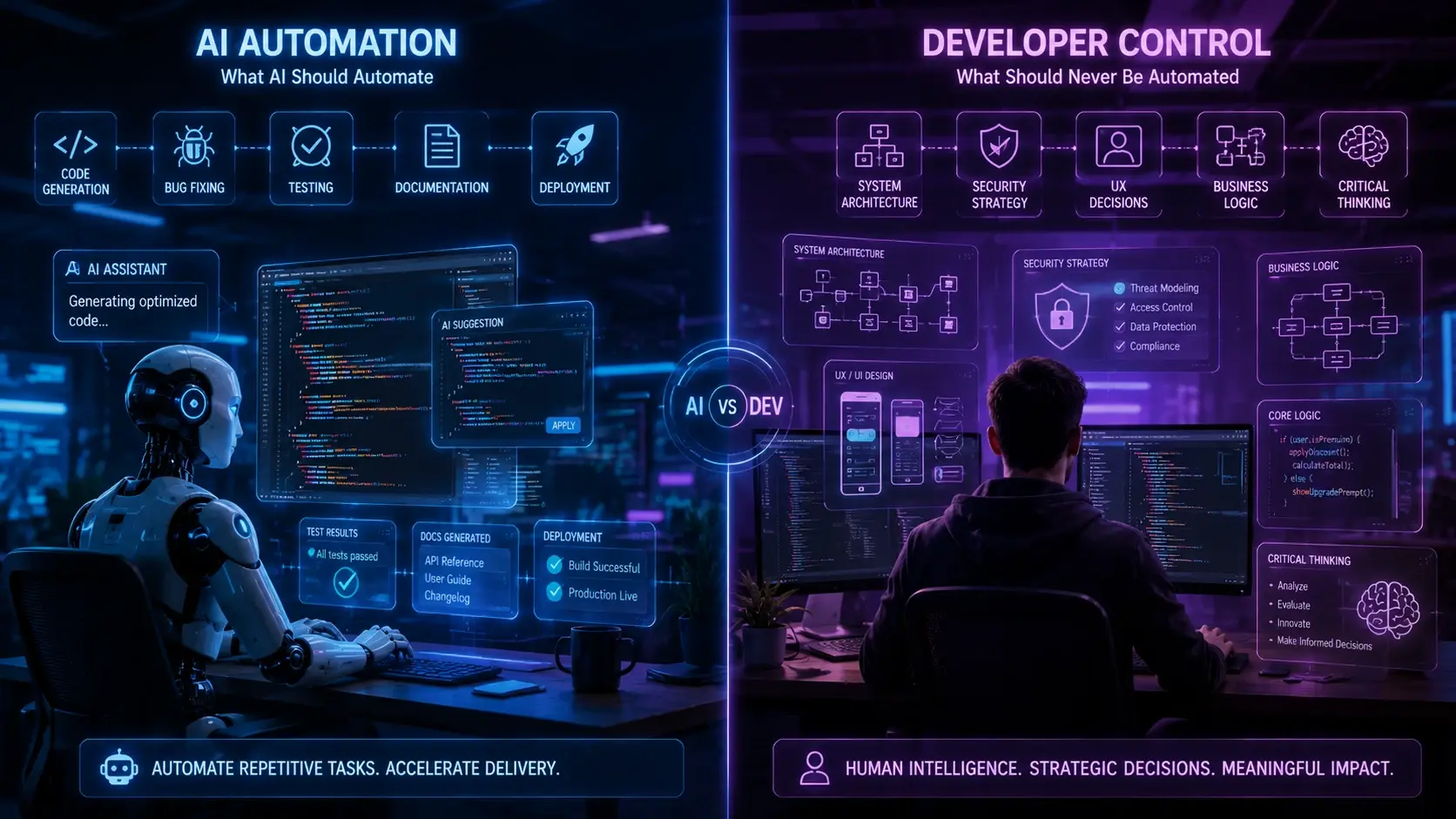
"Where can AI genuinely help us deliver better software, faster?" The answer, it turns out, isn't a universal one; it's surprisingly specific.
This guide aims to distinguish the actual productivity benefits from the surrounding hype.
We'll delve into which development tasks are well-suited for AI assistance, which ones are best left entirely to human expertise, and how to cultivate an engineering culture that effectively utilizes AI without sacrificing ownership of the codebase.
AI really excels in areas that used to consume a lot of development time with repetitive tasks. Think about things like setting up a new API endpoint, creating a database model along with its migrations, or building a React component complete with hooks and error boundaries. These kinds of jobs tend to follow very predictable patterns, and AI tools are great at recognizing and replicating them. For instance, GitHub Copilot can whip up a well-structured Express route, including validation, authentication, and error handling, in mere seconds. What once took five minutes can now be done in about thirty.
But it's not just about speed; there's a significant psychological benefit too. Developers face less resistance when starting new tasks, which can actually lead to higher quality work. They're less likely to cut corners just to get things moving.
Here's what AI is particularly good at:
The reason this works so well is that these tasks have very little variation. The standard way to structure a React component, for example, is pretty well-defined. AI models, having been trained on vast amounts of code from GitHub, have deeply ingrained these patterns.
It might seem a bit odd at first—shouldn't AI be creating code rather than just discussing it?
However, one of the most significant ways AI is benefiting web development is through generating documentation and writing comments. Developers often put off writing documentation. But AI models are capable of analyzing your function's logic and producing clear, precise explanations of its purpose, possible edge cases, and the meaning of its parameters.
The benefit is straightforward: more documentation gets created because it takes less effort. Tools like Cursor AI, ChatGPT, and Claude have all led to better code documentation for teams that have intentionally integrated them.
This is more important than you might realize. Documentation builds value over time. A codebase that's 70% documented (with AI generating the initial text and humans reviewing it) is far easier to maintain than one that's only 20% documented because developers "forgot" to write it.
Here's what's working well:
The reason this works is that writing documentation often requires a lot of effort for what might seem like a small return. AI can significantly reduce this effort, and human reviewers can then ensure the accuracy of the generated content.
AI's role in web development testing is quite specific. It's great at generating the basic structure for tests, like setting up `describe` blocks, creating mock objects, and defining assertion patterns. This definitely speeds up the process of writing tests.
However, there's a crucial point: AI can often produce tests that pass without actually verifying anything important. This is the common issue where everything is mocked, and the test just checks if the mock was called. The test might pass, but it doesn't confirm if the actual behavior is correct.
Areas where AI excels in testing:
Areas where AI falls short in testing:
The most effective teams leverage AI for the repetitive aspects of testing, like setting up the test structure, while relying on human judgment for the strategic decisions about what needs to be tested.
AI models are impressively adept at understanding code structure and offering suggestions for improvement. If your code has deeply nested conditional statements, AI can propose ways to simplify them. Similarly, if you have recurring patterns, AI can identify opportunities to extract that common logic into separate functions.
This capability is especially beneficial for older codebases. A junior developer might spend a significant amount of time trying to figure out why a particular function is difficult to test. An AI tool, on the other hand, can pinpoint the coupling issue in seconds and suggest a refactoring strategy.

5. Investigating Bugs and Getting Debugging Help
When your server throws a confusing error message in the middle of the night, AI tools for web development can genuinely be helpful. You can paste the error, the related code, and your configuration into an AI tool, and it can often pinpoint the problem more quickly than you might.
Stack Overflow used to be the go-to for debugging. Now, tools like Claude or ChatGPT frequently offer more relevant and faster answers because they've processed and synthesized all the debugging knowledge available online.
This is particularly useful for integration problems, configuration challenges, and specific issues related to frameworks. It's less helpful for bugs in your core business logic, which require a deep understanding of your specific requirements.
Here's what it's good for:
● Figuring out framework errors and compatibility issues
● Understanding configuration problems and setting up environments
● Explaining error messages from tools you're not familiar with
● Debugging common problems when integrating libraries
● Interpreting performance profiling data
The reason this works is that these types of problems have been encountered and solved countless times before, and AI has access to that collective knowledge. Your unique business logic bug, on the other hand, has likely only been solved once—by you.
What works well:
The reason this works is that AI models have been trained on vast amounts of code from numerous projects. This extensive exposure allows them to internalize what constitutes "good code" across various styles and domains, enabling them to provide effective refactoring suggestions.
This is the harder conversation. The places where AI assistance actively hurts your engineering capability.
AI assistance can become dangerous here. The way your system is built—how data moves, how different parts work together, and where the lines are drawn—is what keeps your codebase manageable as it expands.
AI models learn from existing code, so they're great at producing code that resembles successful examples. However, designing a system isn't just about making individual pieces look good; it's about making smart choices for the whole picture, considering your specific limitations.
If you ask an AI to "create a shopping cart system," you might end up with code that technically works but breaks your database rules, creates tangled dependencies, or can't handle heavy traffic. It might work for a demonstration, but it won't hold up in a live environment.
The real danger is that the code appears competent. It compiles, and it runs. It's only after weeks of real-world use that you uncover the fundamental design flaws.
Here's why AI struggles with system architecture:
These aspects should remain human-driven:
This is a critical issue. AI-assisted web development tools can sometimes produce security code that appears correct but contains subtle vulnerabilities.
For instance, AI might generate authentication logic that is syntactically sound but susceptible to timing attacks. It could also create permission checks that seem comprehensive but overlook specific edge cases or handle sensitive data in ways that go against established security best practices.
The challenge is that these flaws aren't always obvious. Security bugs often go undetected during testing, only to surface in production when they are exploited.
Consequently, teams that utilize AI for security-sensitive code typically incorporate extra layers of review. They employ security engineers to specifically examine AI-generated code related to authentication, encryption, and permission checks.
Here's why AI struggles with security:
Here are the areas where human oversight remains essential:
Does your shopping cart offer a 10% discount for returning customers? Does your subscription billing prorate charges when users upgrade mid-cycle? Does your payment processing handle declined cards with specific retry logic?
This is all business logic, and it's precisely why understanding the domain is so crucial. AI can certainly generate code to implement your business logic. However, if the business requirements aren't clear or if edge cases haven't been fully specified, the AI will have to make assumptions, and those assumptions might be incorrect.
The most problematic outcome isn't code that simply doesn't work (you'd notice that right away). It's code that appears to work but is subtly flawed—perhaps miscalculating discounts by a small percentage, charging customers incorrectly in specific scenarios, or applying refund logic inconsistently.
Here's why AI struggles with business logic:
Here's what should remain a human responsibility:
4. Database Queries and Data Access Patterns
While AI models can generate SQL queries for straightforward scenarios, they often overlook optimization opportunities. Queries that perform adequately with small datasets can falter under production load.
A query might be semantically correct but introduce issues like N+1 problems, missing indexes, or lock contention. These problems may not surface during development but can lead to production outages as the system scales.
Furthermore, AI typically lacks a deep understanding of your data model, hindering its ability to make informed decisions about denormalization or caching. It might produce technically correct queries that are architecturally suboptimal for your specific scale and consistency requirements.
Reasons AI struggles with data access:
Tasks best left to humans:
5. Error Handling and Edge Case Anticipation
AI-generated error handling code often adheres to conventional patterns, such as returning an error on API failure or logging a database outage. These are actual examples from AI-generated code that missed crucial nuances.
Consider a checkout process: how should it handle slow payment processing? Should it retry, and how many times? Should the customer be charged before or after confirming payment success? What happens if the confirmation call fails, but the charge has already been processed?
These questions don't have universal answers. The appropriate response depends on your business model, liability, and tolerance for different failure scenarios. AI lacks this contextual understanding.
Reasons AI struggles with edge case handling:
* Edge cases are unique to your specific system and business.
* Failure modes have distinct financial and customer satisfaction implications within your context.
* The repercussions of incorrect error handling are often discovered only in production.
* Effective error handling requires understanding consequences, not just established patterns.
Tasks best left to humans:
The best teams using AI-assisted web development aren't trying to maximize AI usage. They're asking smarter questions: Where is AI a force multiplier? Where does it create risk? Where is the effort-benefit trade-off actually favorable?
Here's a practical framework:
Here are tasks where AI assistance is quick and dependable and the risk of errors is minimal:
The process involves running the task through AI, having a human quickly review the output, and then integrating it. In these scenarios, AI provides over 90% of the value.
Here are some tasks where AI can assist, but human expertise is still needed to ensure accuracy:
The general process involves AI generating a first draft, followed by a human review to check for correctness and completeness. If necessary, the human will make substantial revisions. AI typically contributes about 60-70% of the value, with humans adding the crucial element of critical review.
These tasks involve AI suggestions, but humans make final decisions and own the outcome.
Architecture and system design
Error handling for critical paths
Use AI for exploration, brainstorming, and debugging. But humans own all design decisions, write the core logic, and do thorough testing. AI delivers maybe 20-30% value here; human expertise dominates.
These tasks should remain fully under human control.
Security policy decisions
Architecture decisions during system failures
No AI generation. Maybe use AI for research or documentation, but humans own the decisions entirely.
When you write code yourself, you truly understand it. The choices you make, the compromises you accept, the assumptions you build in—they all reside within your own mind. But when someone else writes it, or when AI generates it, that understanding is transferred to you, but it's never quite perfect.
Teams that embrace AI too widely often find themselves in a situation where the codebase starts to feel unfamiliar to everyone. Suddenly, nobody really grasps how the authentication process works, or why the API response is structured in a particular way, or what assumptions the caching mechanism is based on.
This becomes a major problem during production incidents. When your system goes down, you need developers who understand not just the code's syntax but also the underlying intent and logic. AI-generated code that the team hasn't fully internalized can quickly become a liability.
Managing cognitive ownership involves:
* Ensuring developers understand AI-generated code before they commit it.
* Using AI for initial scaffolding, but having humans write the crucial logic.
* Requiring code reviews and comprehension checks before merging AI output.
* Regularly assessing whether your team truly understands your own codebase.
* Prioritizing AI use for tasks where a loss of ownership has minimal impact.
If you're planning to adopt or expand AI assistance in your development:
Pick one specific use case (like API scaffolding or test structure generation) and run it rigorously for two weeks. Measure time saved, defect rates, and team satisfaction. Then expand based on results.
Don't adopt AI everywhere at once. You won't know what's working and what isn't.
For anything beyond Tier 1 usage, make code review explicit. Your CI process should flag AI-generated code for additional scrutiny. This isn't because AI is inherently untrustworthy, but because it deserves different review criteria.
Track three metrics: time saved, defects introduced, and team confidence. Time saved that results in unmaintainable code isn't actually savings. Defects in business logic cost more than time spent getting it right initially.
AI assistance isn't a free lunch. Developers need to understand what AI does well and where it fails. Invest in training about:
When to trust AI output and when to verify carefully
The differences between technical correctness and business correctness
Some decisions—architecture, security, and business logic—should remain under human control. Don't let AI infiltrate these zones "just to see if it helps." It won't, and you'll lose the human expertise you need.
1: Will AI eventually replace developers?
AI won't replace developers in the way many people worry. It's true that AI will take over certain tasks, like generating boilerplate code, handling routine documentation, and cleaning up code. However, the most challenging aspects of software development—like understanding user needs, making crucial architectural decisions, troubleshooting production issues, and acquiring knowledge in new areas—will continue to require human ingenuity.
What we'll likely see is a significant boost in productivity. Developers who effectively leverage AI for their more mundane tasks will be far more efficient than those who don't. Ultimately, teams that combine deep human expertise with AI tools will outperform those attempting to use AI as a substitute for solid engineering principles.
2: How do I measure whether AI-assisted web development is actually helping?
First, choose a baseline metric like days per feature, defects per thousand lines, or time-to-fix bugs. Measure this for two weeks before you start using AI, and then measure it again for two weeks after you've begun using it. Finally, compare the results.
However, don't just focus on how much work is getting done. It's also important to consider the impact on your customers. Are your deployments failing more frequently? Are your defect rates going up? Is your codebase becoming more difficult to maintain? These factors are actually more significant than just how fast development is moving.
3: Should we use AI for security-critical code?
However, don't just focus on how much work is getting done. It's also important to consider the impact on your customers. Are your deployments failing more frequently? Are your defect rates going up? Is your codebase becoming more difficult to maintain? These factors are actually more significant than just how fast development is moving.
AI can be a great tool for exploring options, identifying patterns, and debugging code. However, humans should always be in charge of any function that's critical for security. When it comes to AI-generated security code, it's essential to have a dedicated code review process with a specific focus on security. The standards for code that protects customer data should be even higher, not lower.
4: How do I prevent AI-generated technical debt?
Technical debt accumulates when we opt for speed at the expense of maintainability. The allure of prioritizing speed can be amplified by AI. To address this, we should implement rigorous code reviews that focus on long-term maintainability, rather than solely on immediate functionality.
It would be beneficial to conduct a quarterly audit of our codebase to assess its maintainability. If we find that the code is becoming increasingly difficult to understand and modify, it indicates that our use of AI has potentially entered a Tier 3 level, which is not advisable.
5: What's the learning curve for tools like Cursor AI or GitHub Copilot?
It would be beneficial to conduct a quarterly audit of our codebase to assess its maintainability. If we find that the code is becoming increasingly difficult to understand and modify, it indicates that our use of AI has potentially entered a Tier 3 level, which is not advisable.
It's lower than you might anticipate, though not non-existent. Developers can start being productive with these tools right away, but mastering them takes time and effort. The real challenge isn't learning how the tools work, but rather developing good judgment. This includes knowing when to accept or reject AI suggestions, how to rephrase prompts when the AI misunderstands, and how to confirm the accuracy of its output. Plan for your team to spend about two weeks building genuine proficiency – it's a worthwhile investment.
AI-assisted web development is here to stay. For development teams aiming to stay competitive, these tools are quickly becoming essential.
However, the key to success isn't simply using AI as much as possible. Instead, it's about using AI wisely, recognizing its limitations, and ensuring human expertise remains strong in crucial areas.
The teams that are currently excelling are those that view AI as a specialized tool for particular tasks—automating repetitive code, aiding in documentation, or facilitating code refactoring—rather than as a tool that can generate entire programs.
As these AI tools become more sophisticated, the demand for human expertise actually grows. A deep understanding of systems is necessary to identify errors when AI makes them. Strong architectural knowledge is vital for designing systems that AI can't adequately create on its own. And security expertise is indispensable for reviewing AI-generated code for vulnerabilities.
The future of development won't be dominated by those who are merely proficient with tools like GitHub Copilot. It will be shaped by developers who possess a profound understanding of their systems, enabling them to discern when an AI's suggestion is truly valuable and when it poses a risk.
If your team is trying to figure out how to responsibly adopt AI tools, or if you're questioning whether your current usage is truly sustainable, know that you're not the only one. Many development teams are grappling with these same questions, and the answers are more important than you might realize.
We've partnered with various engineering teams as they've integrated AI, assisting them in pinpointing significant opportunities, like automating routine tasks and improving documentation, while also helping them avoid potential pitfalls related to business logic and security. If you're interested in discussing a practical, well-considered strategy for AI-assisted development that aligns with your unique situation and comfort level with risk, we'd be happy to connect.


 Seo Admin
Jan 21, 2026
 Seo Admin
Nov 07, 2025
 Seo Admin
Apr 17, 2026
 Seo Admin
Dec 24, 2025
 Seo Admin
Jan 30, 2026