
Get a Customized Solution for Your IT Needs
+91 702-705-8777
info@pansofic.com
55-56, 1st floor, Chandigarh Complex, Prabhu Prem Puram, Ambala Cantt, Haryana 133006






Compare Headless CMS vs WordPress in 2026. Learn which platform offers better scalability, security, SEO, performance, and flexibility for growing businesses.
Headless CMS vs WordPress: Which Is Better for Growing Businesses in 2026?
If you're in charge of your company's online presence, you've likely faced this question: should we stick with WordPress or consider a headless CMS?
This decision feels more pressing than ever as businesses grapple with delivering content across various platforms like websites, mobile apps, email newsletters, and social media. The truth is, the answer is often "it depends."
However, the digital landscape has changed so much that the question itself needs a fresh look. It's no longer a simple either/or choice between Headless CMS and WordPress. Instead, it's about understanding what each option provides and how well it aligns with your company's unique requirements.
By 2026, we anticipate a significant split: established companies relying on traditional CMS platforms are encountering limitations, while those that adopted headless architecture early on are reaping the benefits of a competitive edge.
Let's delve into both approaches to help you make the best choice for your business.
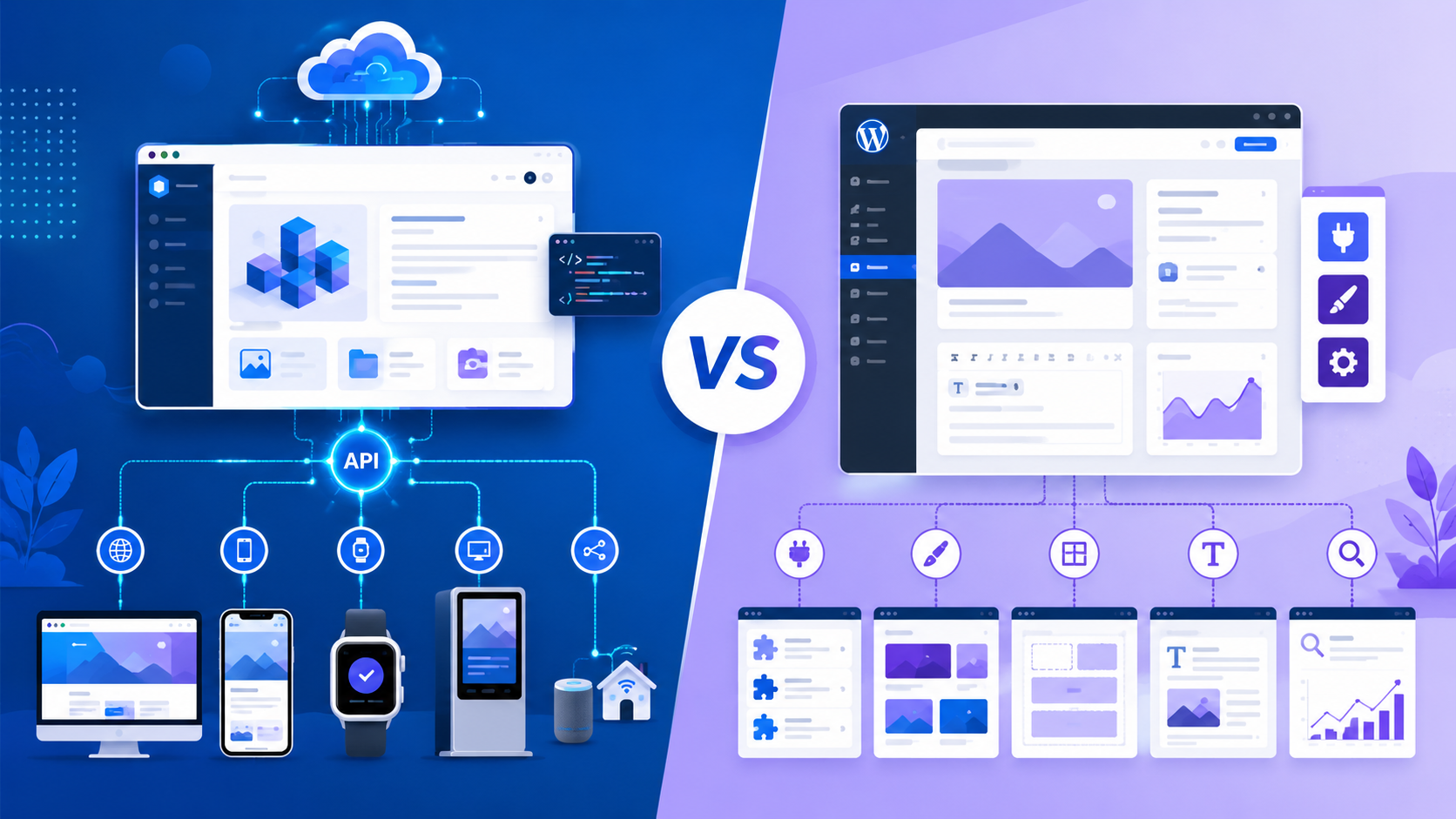
Before diving into headless CMS vs. WordPress, let's clarify what we're actually comparing.
Traditional CMS: WordPress and Similar Platforms
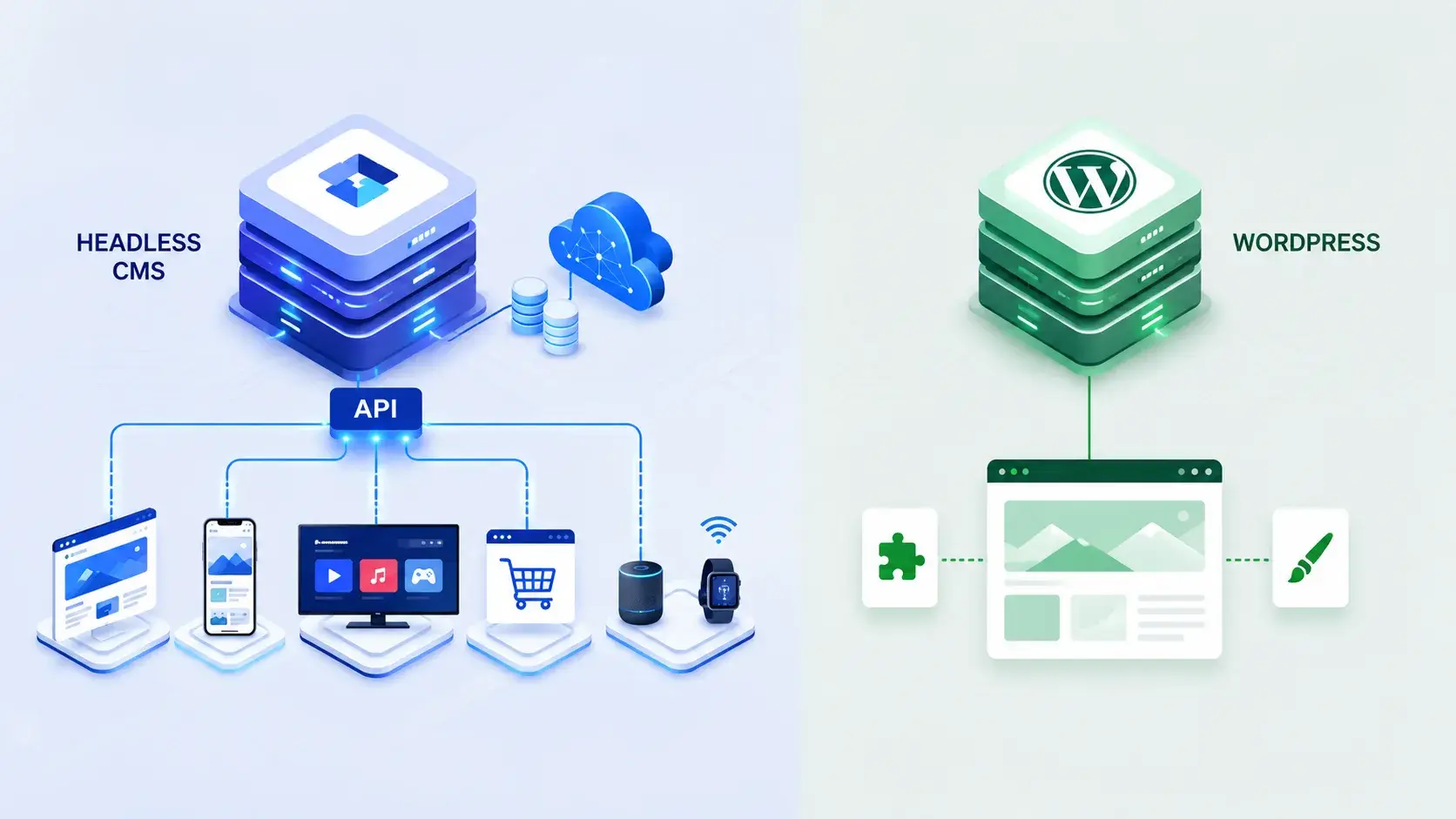
WordPress, much like other content management systems (CMS), is built on a monolithic architecture. This means your content management interface, backend logic, and frontend presentation are all bundled together into a single system.
When you create a post in WordPress, it generates an HTML page, saves it, and then displays it to visitors of your site. This method has been incredibly successful for almost twenty years. It's no surprise that WordPress is used for about 43% of all websites; it's user-friendly, affordable, and doesn't demand a lot of technical know-how to use.
Headless CMS Architecture
A headless CMS completely separates content management from how that content is presented. Think of it like this: the "head," which is how users see the content, is detached from the "body," where the content is stored and managed.
Essentially, the CMS functions solely as a content repository, providing data through APIs. This means your frontend can be built using any technology you choose, whether it's a Next.js application, a mobile app, a static website, or even a combination of all of them.
While this architectural distinction might seem minor, it has significant consequences for your business operations.
Let's start with WordPress because—despite the hype around headless architecture—it remains the right choice for many businesses.
Lower barrier to entry: You don't actually need a dedicated development team to run WordPress. For instance, a marketing manager can easily install plugins, create new pages, and manage content without needing to write any code. The learning curve is really quite gentle.
Extensive plugin ecosystem Looking for an e-commerce solution? You're in luck, as there are thousands of plugins available. Need email integration? It's covered. Complex forms? Those are available too. For businesses aiming to reduce custom development, WordPress offers an unparalleled ecosystem.
Cost-effectiveness at smaller scales: Hosting is quite affordable. Plus, there are plenty of WordPress developers out there who don't charge a fortune. You can get a professional website up and running for less than $100 a month, and that covers your hosting, domain, and theme.
Rich media handling: WordPress was originally designed with bloggers and publishers in mind. Features like media management, featured images, and galleries are built right in and feel very natural to use. The administrative interface is set up to make these tasks easy.
SEO-friendly by default: WordPress creates clean HTML, integrates seamlessly with SEO plugins, and offers built-in features that search engines favor. Consequently, achieving good SEO results demands less optimization work compared to other platforms.
Community and resources: With millions of developers and countless tutorials available, plus active forums, you can be sure that if you run into a problem, someone has already figured it out.
Blogs and content-first websites: For blogs and content-first websites, WordPress remains an excellent choice, especially given its editorial workflow that's very writer-friendly.
Small to medium businesses: It's also a great option for small to medium businesses that have lean teams and limited budgets, as its simplicity and affordability really stand out. If you need to launch quickly to test market fit,
Rapid prototyping: WordPress can get you there faster than building a custom headless solution. It's also ideal for smaller teams without developers
Smaller teams without developers: where a user-friendly interface is crucial for the marketing team managing the website.
Moderate complexity: For websites with standard features like blogs, pages, simple e-commerce, and forms, WordPress handles moderate complexity beautifully.
Headless CMS vs WordPress: When Headless Architecture Wins
Now for the growing category of businesses finding WordPress limiting.
Omnichannel content delivery: You can write content once and deliver it everywhere. The same article can appear on your website, mobile app, email campaign, and social platforms without any changes. Your content team publishes once, and multiple channels automatically consume it.
Technology flexibility: Your frontend team can choose whatever technology makes the most sense. If they love React, they can use it. If they prefer Vue, that's no problem either. Switching frameworks won't affect your CMS, which helps extend the lifespan of your system.
Superior performance: Headless architecture inherently supports static site generation and edge caching. This means you're serving pre-built files from locations all over the world.
Headless CMS-powered sites often achieve better Core Web Vitals than WordPress sites running the same content.
Scalability without compromise: As your traffic grows, headless architecture scales horizontally across edge locations. WordPress tends to require increasing server resources for the same traffic volume.
Developer agility: Frontend and backend teams can work independently. A backend developer can optimize APIs without disrupting the frontend workflow, and the frontend team can implement new features without waiting for backend changes.
Security advantages: Since there's no server-side rendering of HTML, the attack surface is significantly smaller. Headless systems are designed with fewer vulnerabilities.
API-first thinking: In a headless system, you're forced to think in APIs from day one. This creates better architecture for organizations building mobile apps, integrating with third-party services, or planning future channels.
Sophisticated content modeling: With a headless system, you're compelled to think in terms of APIs from the outset. This leads to a better architecture for organizations that are building mobile apps, integrating with third-party services, or planning for future channels. When Headless CMS Becomes Essential
Multi-channel publishing: Headless CMS platforms excel at handling complex content structures. This is particularly beneficial for marketing campaigns that require different content variations for different audience segments or for sophisticated product databases with multiple related content types.
High-traffic, high-performance requirements: Headless systems manage these elegantly.
Complex content structures: If your content model requires sophisticated relationships—products with variants, content blocks with specific metadata, or hierarchical information—headless CMS excels.
International or regional variations: Headless systems elegantly handle content that needs to vary by geography, language, or market without duplicating the content repository.
Frequent technology changes: If you expect to change technologies over the next decade, headless architecture's decoupled nature provides flexibility.
Custom integrations: Companies building sophisticated integrations with CRMs, analytics platforms, or custom systems benefit from headless architecture's API-first approach.
Mobile app requirements: If you're building a mobile app that needs content from your CMS, headless is far superior to retrofitting WordPress.
Here's what the headless CMS evangelists don't always mention: moving to a headless system increases complexity.
You'll need developers who really get API design, frontend frameworks, and deployment pipelines. Setting up a headless CMS is definitely more technically demanding than WordPress. The initial setup and configuration will take more time, and ultimately, your total cost of ownership will go up.
Content teams used to WordPress's WYSIWYG editor might find that headless CMS interfaces aren't as straightforward. When content is separated from how it looks, it can sometimes be confusing for team members who aren't technical.
When you're working with a headless architecture, you typically have to manage several different systems at once. This includes things like the CMS, the frontend application, deployment pipelines, and API documentation. The more components you have, the greater the chance that something might go wrong.
Working with a headless architecture often means you're juggling multiple systems simultaneously. This can include your CMS, the frontend application, deployment pipelines, and API documentation, among other things. The more pieces involved, the higher the likelihood of encountering issues.
So how do you actually choose? Consider these factors:
Single website only? WordPress is likely sufficient.
Website plus mobile app? Consider headless.
Website, app, email, social, emerging platforms? Headless is almost certainly better.
Mostly marketers, limited developers? WordPress keeps control in the hands of your team.
Multiple developers, dedicated frontend team? Headless architecture's flexibility becomes valuable.
Need to hire developers? More WordPress developers exist and cost less.
Moderate traffic (under 100k monthly visitors)? WordPress is fine with good hosting.
High traffic or strict performance requirements? Headless architecture provides better outcomes.
Rapidly growing traffic? Headless scales more elegantly.
Blog posts and standard pages? WordPress is built for this.
Complex relationships between content types? Headless shines.
E-commerce with product variations? Headless handles this better.
Standard integrations (email, analytics)? WordPress plugins handle most.
Custom integrations with internal systems? Headless architecture's API-first approach is superior.
Multiple third-party services? Headless simplifies this.
Limited budget? WordPress's lower cost matters.
Willing to invest in quality? Headless architecture can provide better returns long-term.
Need to balance short-term and long-term costs? This requires careful analysis of your specific situation.
Organizations are increasingly adopting hybrid models, and using WordPress with decoupled frontends is becoming a more practical option. At the same time, headless CMS platforms are improving their content editing experiences, which helps close the gap in user experience. For growing businesses specifically, we're seeing trends toward:
Headless CMS + Next.js: Businesses that require both flexibility for developers and excellent performance often choose this setup. Next.js takes care of rendering, data fetching, and optimization, while the headless CMS handles the content itself.
WordPress headlessly: Some companies use WordPress solely for content management, disabling its theme layer and accessing content through APIs. This approach allows them to benefit from WordPress's established ecosystem while gaining architectural flexibility.
Decoupled WordPress: This offers a middle-ground solution where WordPress manages content, and a separate frontend layer handles the presentation.
Real-World Implications for Growing Businesses
We frequently collaborate with businesses that are experiencing growth, and we've noticed a recurring trend. Many begin with WordPress, which is a sensible decision at the outset, but then encounter limitations after about three to five years.
It's at this stage that the constraints of the platform become evident. Needs for omnichannel capabilities arise, performance demands increase, and the team expands.
This critical juncture leads to a key decision: should we pour more resources into optimizing WordPress, which becomes progressively more expensive, or should we transition to a headless architecture, a substantial but singular undertaking?
While the best course of action varies depending on individual circumstances, the general direction is unmistakable.
The comparison between a headless CMS and WordPress isn't about determining which is superior; rather, it's about identifying which solution aligns best with your business's current position and its future trajectory
1: Can we use WordPress as a headless CMS instead of migrating to a dedicated headless platform?
Yes, and many organizations do this successfully. You can remove WordPress's theme layer and consume its content via the REST API, essentially using it as a headless CMS. This approach leverages WordPress's mature plugin ecosystem while gaining architectural flexibility. The downside is WordPress wasn't optimized for headless use—the admin experience can feel clunky when you're not using its traditional publishing workflow. Dedicated headless CMS platforms like Contentful or Sanity are purpose-built for this, but WordPress headlessly works if you're already invested in the platform and want to avoid migration costs
2: How long does it take to migrate from WordPress to a headless CMS?
The migration timeline depends on your content volume and complexity. A simple blog with 100 posts might take 2-4 weeks. An e-commerce site with thousands of products and complex metadata could take 3-6 months. Most of the time isn't spent on technical migration—it's spent remapping your content structure to fit the new system's data model. The good news: modern migration tools automate much of this work. For growing businesses specifically, we recommend parallel running—keep WordPress live while building the headless version, then gradually shift traffic once validation is complete.
3: If we choose headless CMS, do we need to hire more developers?
You'll likely need developers with different skillsets, not necessarily more total developers. WordPress sites often rely on theme and plugin developers. Headless CMS implementations need frontend framework developers (React/Vue/Next.js). Your total headcount might stay similar, but your hiring profile changes. For content teams specifically, headless CMS can actually reduce dependency on developers—better content modeling means marketers can manage complex content structures without developer intervention. The transition period does require additional expertise, but long-term staffing needs don't necessarily increase.
4: What are the hidden costs of switching to headless CMS that people often overlook?
Beyond development costs, budget for
(1) training—your content team needs to learn a new interface and workflows;
(2) integration work—connecting your CMS to existing tools (email, analytics, ad platforms) often requires custom development;
(3) frontend hosting—you now pay for frontend hosting separately from your CMS,
(4) DevOps complexity—managing multiple systems requires more sophisticated deployment and monitoring.
(5) slower initial feature development—during transition, development often slows as teams learn new patterns. Factor these into your total cost analysis. Many organizations underestimate migration costs by 30-50% because they overlook these hidden expenses.
5: How do we decide if WordPress's limitations are actually holding us back or if we're overthinking this?
Ask yourself these specific questions:
(1) Are you managing content for multiple platforms? If content exists only on your website, WordPress is probably fine. If you need the same content on mobile apps, email, social, or other channels, headless architecture wins.
(2) Do you hit performance limits? If your WordPress site consistently hits Core Web Vitals targets, migration isn't urgent. If you're struggling despite optimization, headless architecture likely helps.
(3) Is your development velocity decreasing? If development time to ship features is increasing despite experienced developers, architectural limitations might be the cause.
(4) Are integration pains accumulating? If you constantly build custom solutions to connect WordPress with external systems, headless CMS simplifies this. If you only need standard plugins, WordPress is probably sufficient. Honestly assess these factors before making the switch.
For comprehensive information on headless CMS technologies and best practices, refer to Contentful's Headless CMS Guide , a recognized industry resource documenting headless architecture principles and implementation strategies.
The decision between headless CMS and WordPress isn't about ideology or keeping pace with trends. It's about practical alignment between your business needs, your team's capabilities, and your growth trajectory.
At Pansofic Solutions, we've helped growing businesses navigate this exact decision. We analyze your content strategy, evaluate your team's capabilities, and recommend approaches that balance innovation with pragmatism.
Unsure which architecture fits your business?
Schedule a consultation with our CMS specialists . We'll discuss your current setup and your growth plans and provide honest guidance on whether WordPress optimization, a headless architecture, or a hybrid approach makes sense for your organization.


 Seo Admin
Jan 21, 2026
 Seo Admin
Nov 07, 2025
 Seo Admin
Apr 17, 2026
 Seo Admin
Dec 24, 2025
 Seo Admin
Jan 30, 2026