
Get a Customized Solution for Your IT Needs
+91 702-705-8777
info@pansofic.com
55-56, 1st floor, Chandigarh Complex, Prabhu Prem Puram, Ambala Cantt, Haryana 133006






Understand the SEO terms every business owner and marketer should know. Learn about SERPs, search intent, keywords, backlinks, crawling, indexing, Core Web Vitals, redirects, structured data, SEO metrics and E-E-A-T with practical examples from Pansofic Solutions.
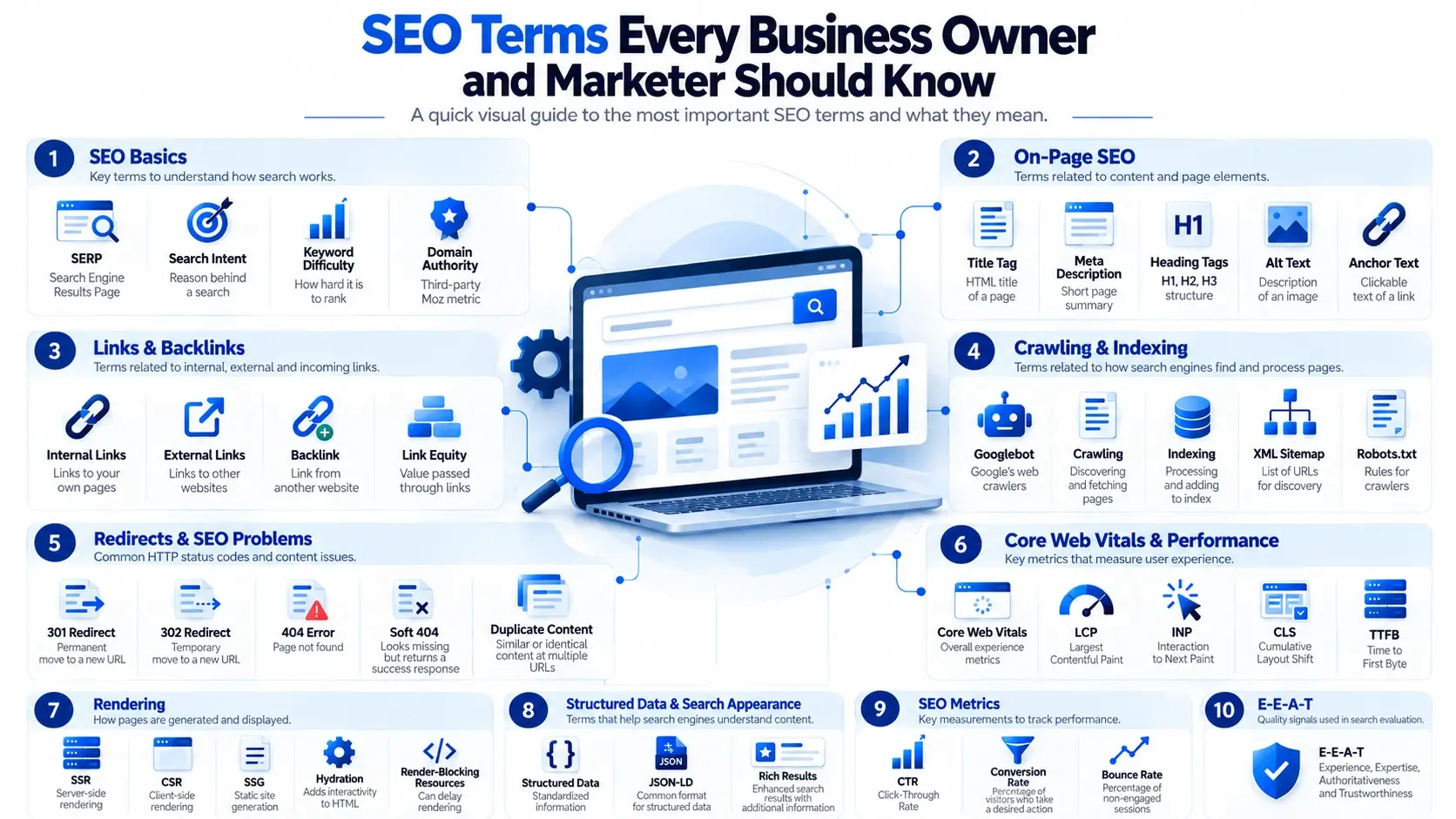
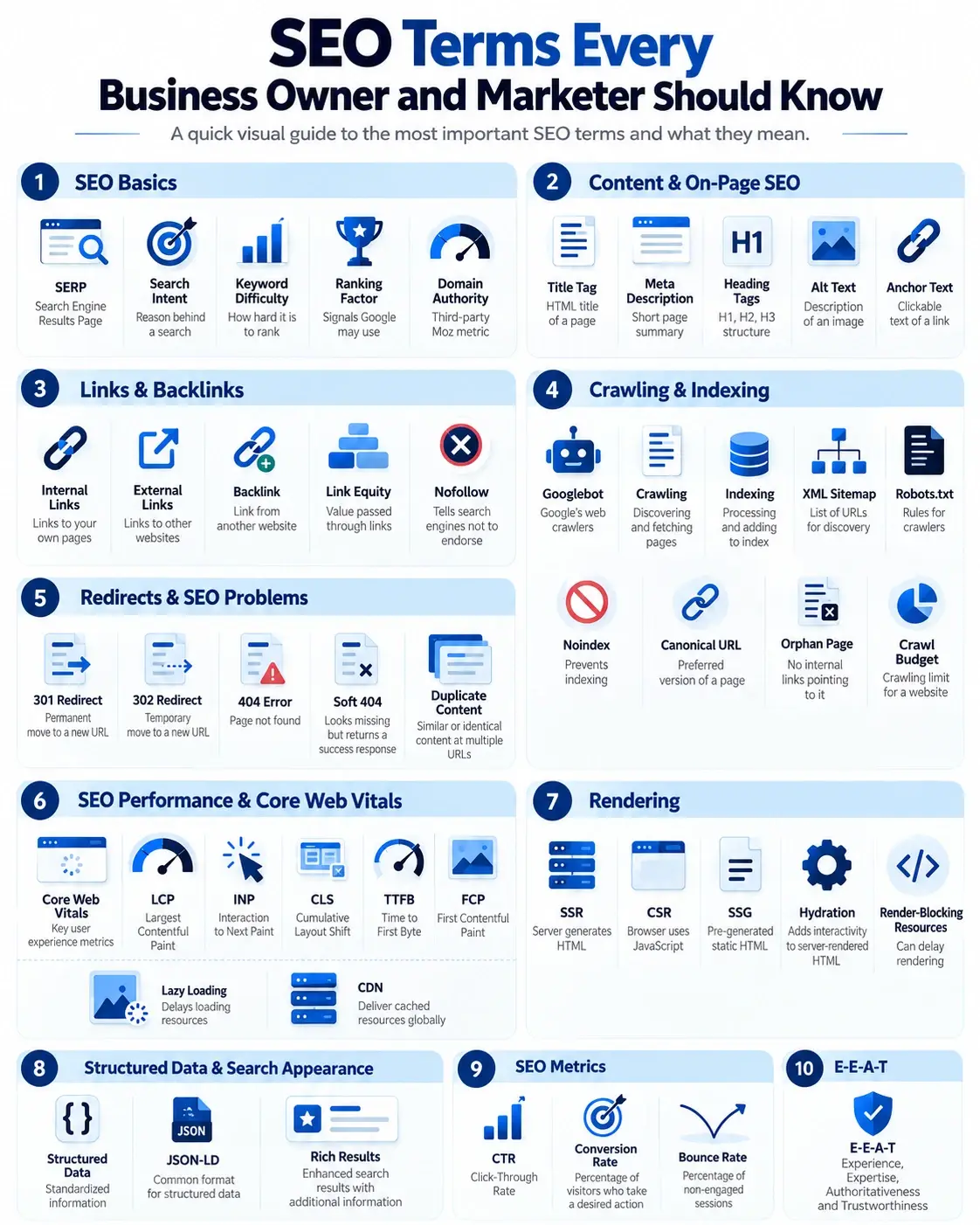
SEO can feel full of technical terms. Crawl budget, canonical URLs, backlinks, Core Web Vitals, JSON-LD, LCP, INP, and CLS are just a few. You don't need to be a developer to understand SEO, but knowing the basic terminology makes it easier to understand SEO reports, communicate with your SEO team, and identify what needs attention.
Throughout this guide, we'll also use examples to show how these SEO terms can apply to a real business website.
SERP stands for Search Engine Results Page. It is the page Google displays after someone searches for something.
Example: If someone searches for “SEO services in India”, the page showing Google's results, ads, maps, featured results and organic listings is the SERP.
Search intent is the reason behind a search. A person may want to learn something, find a particular website, compare options, buy a product or service, or find a local business.
Example: Someone searching for “what is SEO” probably wants to learn, while someone searching for “ SEO services for business ” may be comparing service providers. Understanding this difference helps Pansofic create pages that match what the searcher actually wants.
Keyword Difficulty is a metric used by SEO tools to estimate how difficult it may be to rank for a particular keyword. Different tools calculate it differently.
Example: Before targeting a competitive keyword such as “digital marketing”, an SEO team may check its keyword difficulty and compare it with related, more specific keywords that may be easier to target.
A ranking factor is a signal or system Google may use when determining which results to show for a search. SEO involves many areas, including content relevance, links and technical accessibility.
Example: When optimizing a service page, the focus should not be on one single ranking factor. Content relevance, page experience, internal linking, technical accessibility, and other signals can all matter.
Domain Authority is a third-party SEO metric developed by Moz. It predicts a domain's ranking ability based on Moz's own calculations. DA is not a Google ranking score.
Example: If an SEO report shows a change in Pansofic Solutions' DA, it should be treated as an SEO tool metric rather than a score assigned by Google.
The title tag is the HTML title of a webpage. It can influence the title shown in search results and appears in the browser tab.
Example: A Pansofic SEO service page may have a title tag such as “ SEO Services for Businesses | Pansofic Solutions ”. The title tells both users and search engines what the page is about.
A meta description is a short description of a webpage. Google may use it as the search-result snippet, although it can also generate a different snippet.
Example: A meta description for a Pansofic SEO page could briefly explain the SEO services offered and encourage potential customers to explore the page.
H1, H2, and H3 headings organize webpage content and make it easier for users and search engines to understand the page structure.
Example: On a Pansofic SEO page, the H1 could introduce the main service, while H2 headings could cover SEO services, the SEO process, benefits, FAQs and the next step for potential clients.
Alt text is a written description of an image. It supports accessibility and gives search engines useful context about the image.
Example: Instead of leaving an SEO-related image without alt text, a relevant description could explain what the image represents, provided it accurately describes the image.
Anchor text is the clickable text of a hyperlink. Descriptive anchor text helps users understand where a link will take them.
Example: On a Pansofic blog about SEO, linking the words “SEO services” to the relevant Pansofic service page gives users a clear idea of what they will find after clicking.
Links from one page of your website to another page on the same website. They help users navigate and help search engines discover related pages.
Example: A Pansofic blog about digital marketing could link to the Pansofic Digital Marketing service page. A web development article could also link to the Web Development service page where relevant.
Links from your website to another website.
Example: If a Pansofic article references Google's official documentation and links to the relevant Google page, that is an external link.
A link from another website to your website. Relevant, useful backlinks can help search engines discover pages and can contribute to a site's authority.
Example: If a relevant business or technology website publishes an article that mentions Pansofic Solutions and links to their website , that link is a backlink for Pansofic.
The concept of value or signals being passed through links between pages. The actual impact depends on factors such as relevance and how Google evaluates the link.
Example: Internal links between relevant Pansofic pages can help search engines understand the relationship between its services and supporting content.
A link attribute that tells search engines about the linking site's lack of endorsement of the destination in the usual way. Google treats it as a hint.
Example: If Pansofic receives a backlink with a nofollow attribute, it should not automatically be considered useless. Google may still use the link as a hint and users can still click it.
Googlebot is the name used for Google's web crawlers, which discover and fetch webpages.
Example: When Googlebot discovers a new Pansofic blog through internal links or a sitemap, it can fetch the page and process its content.
The process of discovering and fetching webpages.
Example: When Google discovers and fetches a newly published Pansofic article, that process is called crawling.
The process in which Google processes a page and may add it to its search index.
Example: A Pansofic blog can be crawled successfully but still may not appear in Google search results. Crawling and indexing are separate processes.
The amount of crawling Google is willing and able to perform on a website within a given period. It matters more for large or frequently changing websites.
Example: For a smaller business website such as Pansofic, crawl budget is generally less of a concern than it can be for very large websites with thousands or millions of URLs.
A file containing URLs that you want search engines to discover. A sitemap helps discovery but does not guarantee indexing.
Example: The Pansofic XML sitemap can include important pages such as its service pages, blog posts and other pages that should be discoverable by search engines.
A file containing rules that tell crawlers which parts of a website they are allowed or disallowed to crawl.
Example: If a section of the Pansofic website should not be crawled, robots.txt may contain rules related to that section. However, robots.txt should not be treated as a replacement for noindex when the goal is to keep a page out of search results.
A directive that tells search engines that a page should not be included in search results.
Example: If Pansofic has a page that is useful for a specific internal purpose but should not appear in Google search results, a noindex directive may be appropriate.
A signal that tells search engines which URL is the preferred version when similar or duplicate pages exist. It is a hint, not an absolute command.
Example: If similar versions of a Pansofic page are accessible through different URLs, a canonical URL can help indicate which version should be treated as the preferred one.
A page that has no internal links pointing to it from other pages on your website, making it harder to discover.
Example: If an important Pansofic service page exists but no other page on the website links to it, it could become an orphan page. Adding relevant internal links can make the page easier to discover.
Indicates that a URL has moved permanently to another URL. It is commonly used during website restructuring and migrations.
Example: If Pansofic permanently changes the URL of an important service page, a 301 redirect can send visitors and search engines from the old URL to the new one.
Generally indicates that a URL has moved temporarily.
Example: If a Pansofic page temporarily needs to send visitors to another URL while a change is being made, a 302 redirect may be appropriate depending on the situation.
A 404 status code means the requested page was not found.
Example: If someone visits an old Pansofic blog URL that no longer exists, the server may return a 404 response.
A page that appears to users as though the requested content does not exist, while the server returns a successful response instead of an appropriate error status.
Example: If a deleted Pansofic service page displays a “page not found” message but technically returns a 200 status code, it could be treated as a soft 404.
Substantially similar or identical content available at multiple URLs. Canonicalization and good site architecture can help manage it.
Example: If substantially identical versions of a Pansofic service page are accessible through multiple URLs, the site should be reviewed to determine whether canonicalization, redirects or another solution is appropriate.
Google's user-experience metrics focus on loading performance (LCP), interaction responsiveness (INP), and visual stability (CLS).
Example: When reviewing the technical performance of the Pansofic website, Core Web Vitals can help identify whether visitors are experiencing slow loading, delayed interactions or unexpected layout movement.
Measures how quickly the largest visible content element loads.
Example: If the main hero section on a Pansofic page takes too long to appear, the page's LCP may be affected.
Measures how quickly a page responds to user interactions such as clicks, taps and keyboard actions.
Example: If a visitor clicks a menu, form button or interactive element on a Pansofic page and the response is delayed, that interaction can contribute to a poor INP measurement.
Measures unexpected movement of content while a page loads.
Example: If text or buttons on a Pansofic page suddenly move because an image or another element loads later, this can contribute to a higher CLS.
Measures how long it takes for the browser to receive the first byte of a server response.
Example: When auditing the Pansofic website, TTFB can help identify whether the server takes too long to begin responding to a visitor's request.
Measures when the first piece of meaningful content appears on the screen.
Example: If a visitor opens a Pansofic webpage and has to wait before seeing the first visible content, FCP can help measure that initial loading experience.
Delays loading certain resources, such as images, until they are needed or approaching the viewport.
Example: Images further down a long Pansofic service or blog page can potentially use lazy loading so that resources needed immediately are prioritized.
A network of servers in different locations that can deliver cached resources from a location closer to visitors.
Example: A CDN can help deliver website assets such as images, CSS and JavaScript from locations that are closer to visitors, depending on the CDN setup.
The server generates the HTML for a page before sending it to the browser.
Example: With server-side rendering, the server can generate the initial HTML for a Pansofic webpage before the browser receives it.
The browser relies heavily on JavaScript to build or update the page.
Example: A Pansofic web application that relies heavily on JavaScript to generate content in the browser may use client-side rendering.
Webpages are generated as static HTML files ahead of time and served to visitors.
Example: A website or part of a website can use static generation when its pages can be generated in advance rather than built dynamically for every visitor.
JavaScript takes server-rendered HTML and adds the functionality needed for interactive elements.
Example: On a modern Pansofic web application, the initial HTML can be rendered on the server and JavaScript can then make buttons, forms or other components interactive through hydration.
CSS or JavaScript resources that can delay the browser from rendering visible content.
Example: If a Pansofic page loads large CSS or JavaScript files before showing its main content, those resources may slow rendering.
A setup where a pre-rendered version may be served to certain crawlers while users receive the normal version. It is generally a workaround for some JavaScript-heavy sites.
Example: If a JavaScript-heavy website needs a pre-rendered version for certain crawlers, dynamic rendering may be considered, but it should be evaluated based on the site's specific setup.
Standardized information added to a webpage to help search engines understand what the content represents, such as an article, product, event or local business.
Example: Structured data can help search engines understand that a Pansofic webpage represents an article, organization, service or another supported content type.
A common format for implementing structured data, normally placed inside a script element using application/ld+json.
Example: JSON-LD can be added to relevant Pansofic pages to provide structured information about the content in a format search engines can process.
Enhanced search results that can display additional information depending on the content type and Google's systems.
Example: If a Pansofic page qualifies for a supported rich result, Google may display additional information alongside the standard search result. Structured data can help Google understand eligible content, but it does not guarantee a rich result.
The percentage of impressions that result in clicks. For example, 5 clicks from 100 impressions equals a 5% CTR.
Example: If a Pansofic page appears in Google search results 1,000 times and receives 50 clicks, its CTR is 5%.
The percentage of visitors who complete a desired action, such as submitting a form, calling, purchasing, or booking.
Example: If 100 people visit a Pansofic service page and 5 of them submit an enquiry form, the conversion rate for that action is 5%.
A Google Analytics metric describing the percentage of sessions that are classified as non-engaged. The old definition of 'viewed only one page' is too simplistic for modern analytics.
Example: When reviewing Pansofic's GA4 data, bounce rate should be considered alongside engagement, traffic sources, landing pages, and conversions rather than being treated as a standalone measure of page quality.
E-E-A-T stands for Experience, Expertise, Authoritativeness and Trustworthiness. These concepts appear in Google's Search Quality Evaluator Guidelines and help human evaluators assess the quality of search results. Businesses can support these qualities by providing accurate information, identifying content creators, demonstrating relevant experience and maintaining trustworthy business information.
Example: Pansofic can support these qualities by providing accurate information about its services, clearly identifying the business, publishing useful expertise-led content and maintaining consistent business information across its website and relevant online profiles.
You don't need to memorize every SEO term. Understanding the basics makes it easier to ask the right questions and understand what your SEO team is reporting.
SEO is more than adding keywords to a webpage. It involves technical SEO, content, links, user experience, search intent and measurement working together.
At Pansofic Solutions, we work across website development, SEO, digital marketing and customized IT solutions to help businesses improve their online presence.
Need help with your website SEO or technical audit? Connect with Pansofic Solutions .


 Seo Admin
Jan 21, 2026
 Seo Admin
Nov 07, 2025
 Seo Admin
Apr 17, 2026
 Seo Admin
Dec 24, 2025
 Seo Admin
Jan 30, 2026