
Get a Customized Solution for Your IT Needs
+91 702-705-8777
info@pansofic.com
55-56, 1st floor, Chandigarh Complex, Prabhu Prem Puram, Ambala Cantt, Haryana 133006






Master modern web development in 2026. Learn about technologies, architecture patterns, best practices, and how to choose the right web development partner for your business.
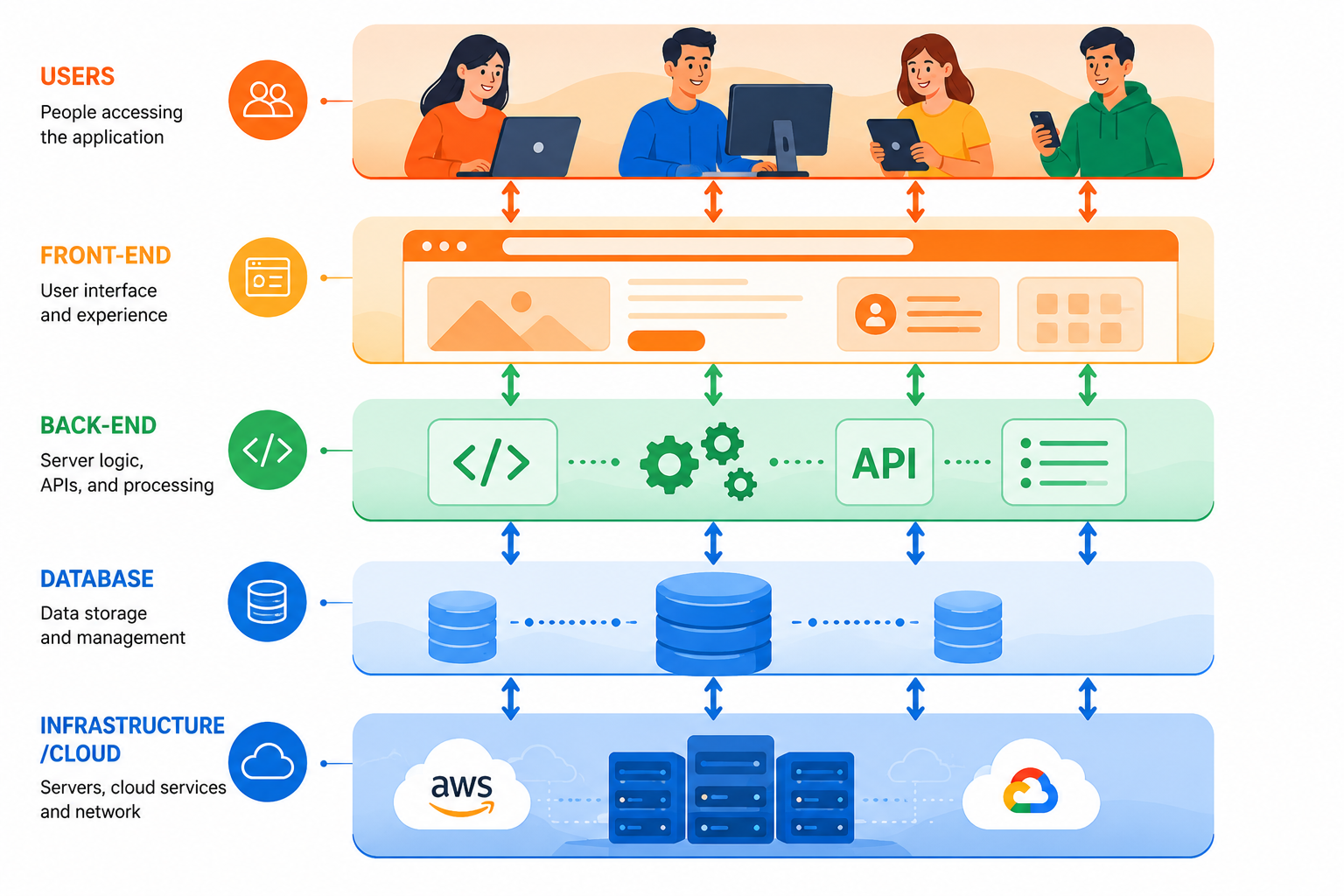
If you're a business owner or decision-maker evaluating web development services, you might feel overwhelmed by the technical jargon: React, Node.js, APIs, microservices, cloud infrastructure, DevOps. What does it all mean? And more importantly, how does it impact your bottom line?
The truth is, modern web development has evolved dramatically. It's no longer just about building a website. Today's web applications need to handle millions of users, process real-time data, integrate with dozens of third-party services, and deliver seamless experiences across all devices and browsers.
At Pansofic Solutions, we've built hundreds of web applications for businesses in Ambala, Shimla, Mohali, Jammu, and across India. Through this guide, we'll demystify web development, explain why modern technologies matter, and show you how to evaluate whether a web development company truly understands modern practices.
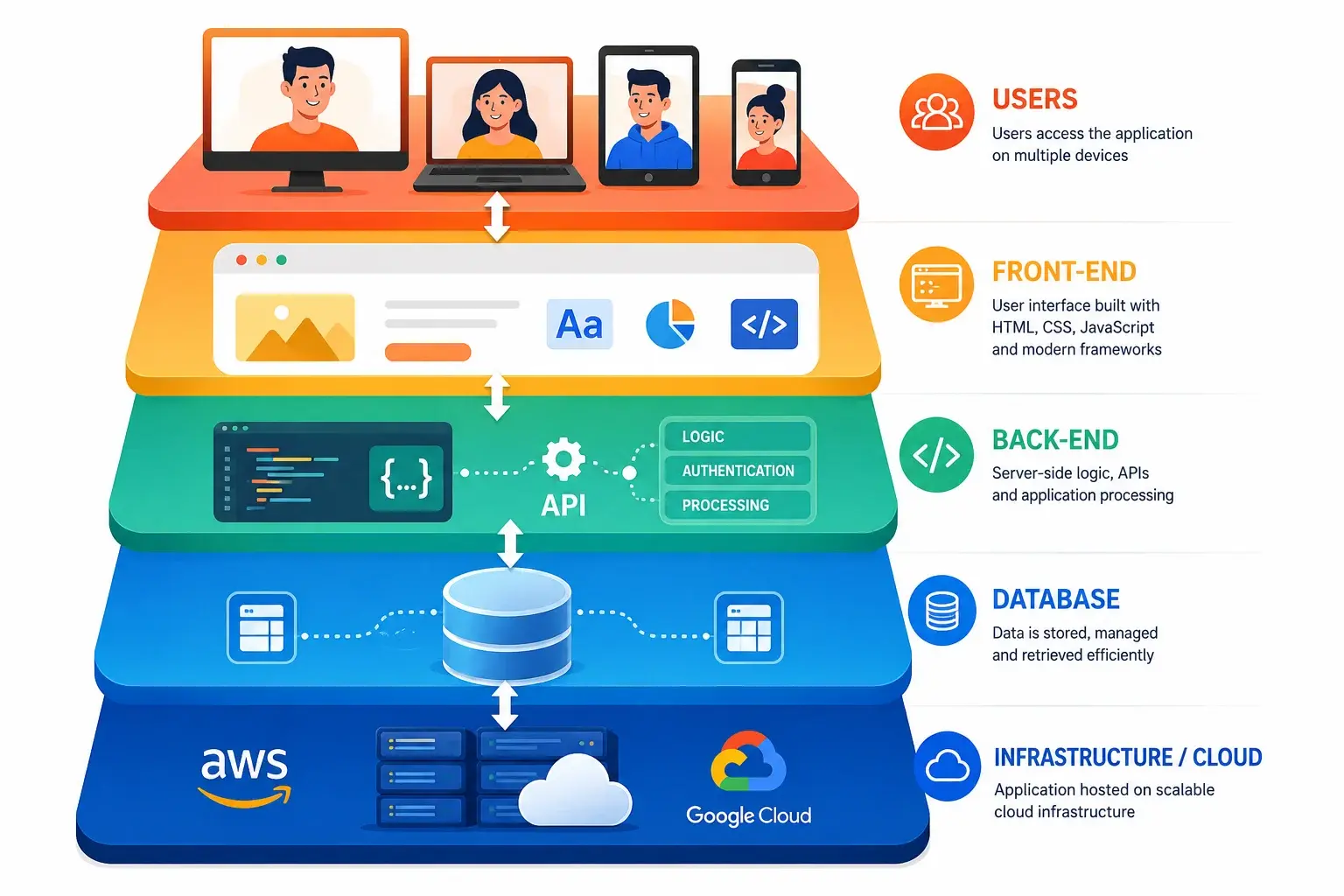
Web development is the practice of building and maintaining web applications—everything from simple websites to complex software platforms that run entirely in web browsers.
Web development is typically divided into three areas:
Front-end development is what users see and interact with in their browser. Modern front-end development includes:
Core Technologies:
HTML5 - The structure and semantic foundation
JavaScript (ES6+) - Interactivity and dynamic behavior
Modern Frameworks & Libraries:
React - Component-based UI library from Facebook
Svelte - Modern framework with minimal overhead
Key Responsibilities:
Creating responsive, mobile-first interfaces
Cross-browser compatibility testing
Back-end development is the server-side logic that powers your application. It's what happens "behind the scenes" that users don't see, but absolutely depend on.
Common Server-Side Languages:
Node.js (JavaScript) - JavaScript on the server
C#/.NET - Microsoft ecosystem
Back-End Responsibilities:
Database design and management
Scalability and performance optimization
Modern web development also includes deployment and infrastructure management:
Key Areas:
Cloud Platforms - AWS, Google Cloud, Azure
Security - Firewalls, SSL, vulnerability management
You might be wondering, "Why should I care about React vs. Vue? Or Node.js vs. Python? Can't I just build a website?"
The answer is the technology stack directly impacts your business outcomes.
Every 100ms of additional load time reduces conversion rates by 1% (according to studies). For an e-commerce site doing ₹1 crore annually, this means ₹10 lakhs in lost revenue per 100 ms.
Modern web development frameworks and practices are optimized for speed:
Code splitting reduces initial page load
Caching strategies minimize database queries
What happens when your startup suddenly goes viral? A poorly built website crashes. Modern architecture handles growth:
Microservices allow parts of your application to scale independently
CDNs serve content from servers closest to users globally
Security breaches can destroy a business. Modern development practices include the following:
HTTPS encryption (not optional anymore)
Compliance with regulations (GDPR, data protection laws)
Code written today needs to be modified, maintained, and updated for years. Clean, modern code:
Is easier for new developers to understand
Scales better as requirements change
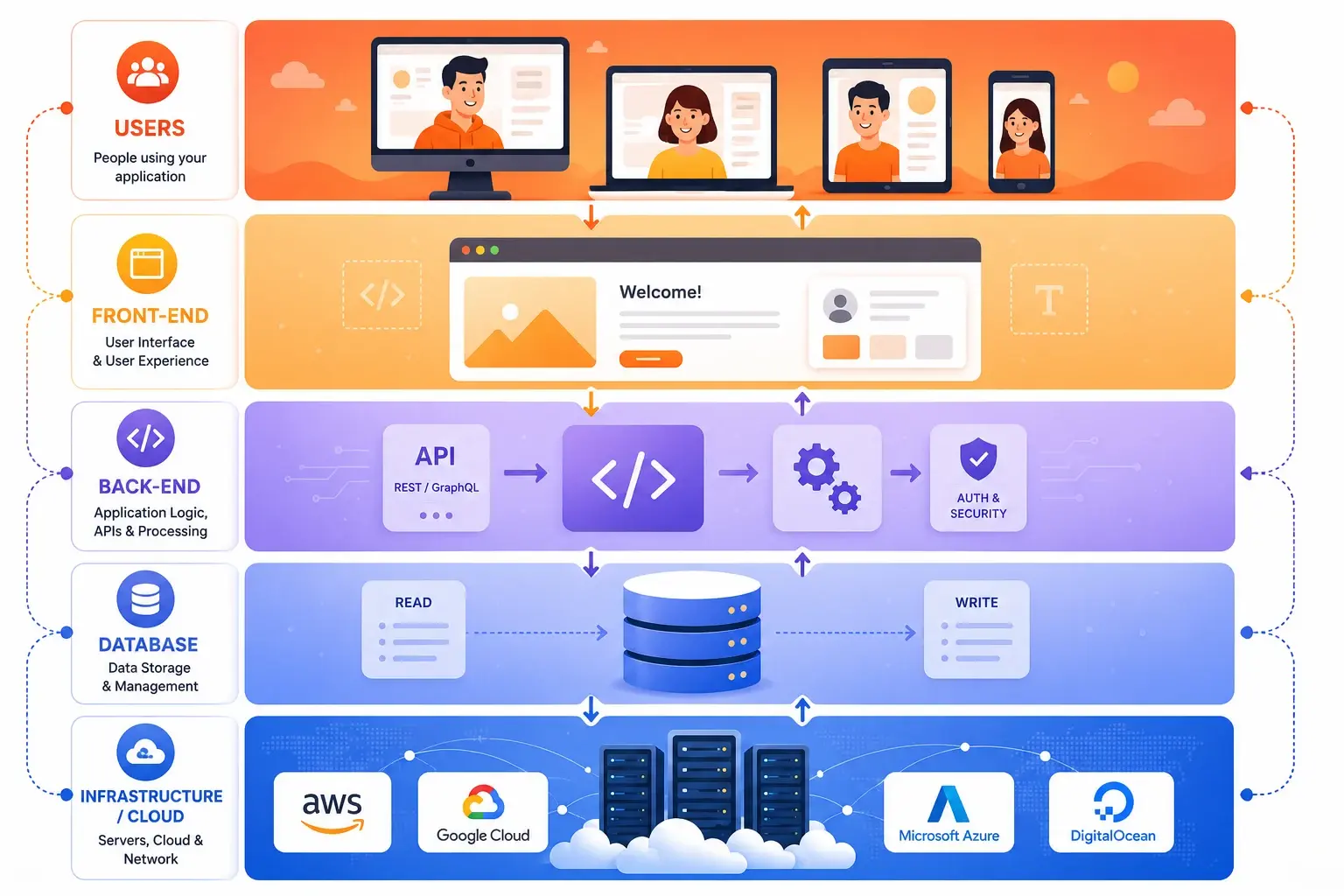
Understanding different architectural approaches helps you understand what you're investing in:
What it is: The entire application is built as one large codebase, deployed as a single unit.
Pros:
Simpler to initially develop
Good for small, simple applications
Cons:
Difficult to scale individual features
Difficult for large teams to work on simultaneously
Best for: Small websites, simple applications
What it is: The application is split into small, independent services that communicate via APIs.
Examples:
User service (handles authentication)
Notification service (sends emails/SMS)
Pros:
Scale only the services that need it
Better fault isolation
Cons:
More complex to set up and manage
Network communication between services adds complexity
Best for: Growing businesses, complex applications, large teams
What it is: You write functions that run on cloud providers' servers. You only pay for what you use.
Pros:
No server management required
Reduced operational overhead
Cons:
Limited control over execution environment
Vendor lock-in concerns
Best for: APIs, background jobs, event-driven applications
What it is: JavaScript, APIs, and Markup (pre-built static files) served from CDNs.
Pros:
Lightning-fast performance
Cost-effective
Cons:
Limited real-time capabilities
Builds can take time for large sites
Best for: Marketing sites, blogs, documentation, e-commerce product pages
Let's break down some technologies you'll hear about:
Relational Databases (SQL):
Examples: PostgreSQL, MySQL, SQL Server
Common use: User accounts, inventory, orders
NoSQL Databases:
Examples: MongoDB, Firebase, DynamoDB
Common use: User preferences, real-time analytics, mobile apps
In-Memory Databases:
Examples: Redis, Memcached
Common use: Session storage, leaderboards, real-time notifications
APIs are how different parts of your application (and different applications) talk to each other.
REST APIs:
Most common approach
Easy to understand and implement
GraphQL:
Newer approach
Better for mobile apps and complex data requirements
WebSockets:
Real-time, two-way communication
Used for: Chat, notifications, live updates, gaming
Git (specifically GitHub, GitLab, Bitbucket):
Allows multiple developers to work on the same codebase
Industry standard since 2010s
Here's how professional web development companies like Pansofic Solutions build applications:
Define requirements and user stories
Estimate timeline and costs
Duration: 1-2 weeks for typical projects
Set up version control (Git)
Create code standards documentation
Duration: 3-5 days
Back-end developers build APIs and business logic
Daily/weekly progress meetings
Duration: 4-12 weeks depending on complexity
Automated testing (unit tests, integration tests)
Browser/device testing
Duration: 2-4 weeks
Deploy to staging environment for final verification
Monitor closely for issues
Duration: 1-2 days
Monitor performance and errors
Regular backups and security updates
Duration: Ongoing
Client: Mid-sized service provider (consulting firm) in Chandigarh
Initial Situation:
Outdated website built with old PHP (2012)
Security vulnerabilities from outdated dependencies
Our Approach:
Migrated to modern Node.js + React architecture
Set up comprehensive monitoring and alerting
Technical Results:
Page load time: 6.2s → 0.8s (87% improvement)
Application error rate: 0.3% → 0.01%
Business Results:
Lead form submissions increased 34% (faster site, better UX)
Annual savings: ₹15 lakhs from reduced operations + ₹25 lakhs from improved conversions
Total ROI: 280% first year
The Problem: Building with the latest trendy framework without considering your needs.
The Solution: Choose technology that matches your requirements, team expertise, and long-term maintenance.
The Problem: "We'll optimize later" — and optimization becomes exponentially harder.
The Solution: Make performance a requirement from day one. Measure it constantly.
The Problem: Adding security at the end is expensive and often incomplete.
The Solution: Security should be part of architecture design, not a bolt-on feature.
The Problem: Manual testing is slow and misses bugs. Changes become risky.
The Solution: Implement automated tests from the beginning. 70%+ code coverage is reasonable for new projects.
The Problem: You don't know what's happening with your application in production.
The Solution: Implement logging, monitoring, and alerting from day one.
The Problem: When the developer who built it leaves, no one understands the code.
The Solution: Document as you build. Code comments, API documentation, architecture diagrams.
The Problem: The application works fine with 100 users but breaks at 10,000.
The Solution: Design for scale from the beginning, even if you don't need it yet.
Your technology stack is the set of tools, languages, and frameworks you use to build the application. Here are common combinations:
Front-end: React or Vue.js
Why: Rapid development, scale easily, full JavaScript stack (one language everywhere)
Front-end: Angular or React
Why: Enterprise support, strong typing, proven at scale, existing teams familiar
Front-end: Next.js or Nuxt.js
Why: Amazing performance, SEO-friendly, content flexibility
Front-end: React or Vue.js
Why: Low latency, real-time updates, handles concurrent connections
Developers are integrating AI models into applications:
AI-powered search and recommendations
Image and video processing
Instead of all processing happening in a distant data center, computation moves to servers closer to users:
Lower latency
Technologies: Cloudflare Workers, Vercel Edge Functions
Applications are built around APIs from the beginning:
Enables mobile apps, web apps, integrations to all use same backend
Better for modern development workflows
TypeScript (JavaScript with type safety) is moving from "nice to have" to standard:
Catches bugs earlier
Major frameworks now built with TypeScript
Web applications are becoming more efficient:
Lower power consumption
Green hosting becoming important differentiator
Moving from "trust the internal network" to "verify everything":
Every request is authenticated and authorized
Encryption everywhere
When you're choosing a web development partner, here's how to assess their technical depth:
1. "What's your approach to testing?"
✅ Good answer: "We implement unit tests, integration tests, and end-to-end tests. We aim for 70%+ code coverage."
❌ Bad answer: "Our QA team tests everything manually."
2. "How do you handle scaling?"
✅ Good answer: "We design for scale from the beginning. We use load testing to identify bottlenecks and implement caching, database optimization, and infrastructure scaling."
❌ Bad answer: "We'll scale when we need to."
3. "What's your deployment process?"
✅ Good answer: "We use automated CI/CD pipelines. Tests run automatically, and we can deploy to production in minutes."
❌ Bad answer: "We manually test and deploy on Friday evenings."
4. "How do you handle security?"
✅ Good answer: "Security is part of our architecture design. We use HTTPS, encrypt sensitive data, regularly update dependencies, and conduct security audits."
❌ Bad answer: "We use standard practices."
5. "What technologies are you proficient in?"
✅ Good answer: They list specific frameworks, languages, and tools. They explain trade-offs.
❌ Bad answer: They claim expertise in everything.
6. "How do you handle monitoring after launch?"
✅ Good answer: "We implement comprehensive logging, monitoring, and alerting. We track performance metrics and proactively identify issues."
❌ Bad answer: "We hand off the application and you manage it."
The company insists there's only one "right" technology choice
No automated deployment process
They ask questions about your business goals and constraints
They're continuously learning and updating skills
Building an application cheaply often costs much more in the long run:
Cheap Development → Expensive Consequences:
Security vulnerabilities → Data breaches → Legal liability
Scalability issues → Server crashes during growth → Lost business
Example: Building a cheap website for ₹2-3 lakhs that requires a complete rewrite after 2 years costs ₹50 lakhs total. Building it right for ₹8-10 lakhs that can grow and evolve for 5+ years is better economics.
What should the application do?
What's your timeline?
Include the above information in a document. Share it with potential development partners.
Look for:
Clear understanding of your requirements
Post-launch support plan
Ask to speak with previous clients
Ask if the project came in on time and budget
Good development doesn't end at launch
Consider growth and scalability from the start
Modern web development is complex, but the principles are clear:
When you partner with a professional web development company that understands modern practices, your investment in technology becomes a competitive advantage, not just an IT expense.
At Pansofic Solutions, we've built web applications using modern architecture, best practices, and proven technologies. We don't just build websites—we build scalable, secure, performant applications that drive your business forward.
Whether you're a startup in Ambala, an enterprise in Delhi, or a growing business anywhere in India, we bring modern web development expertise to transform your digital vision into reality.
Phone: +91 7027-058-777
Jammu, Jammu & Kashmir


 Seo Admin
Jan 21, 2026
 Seo Admin
Nov 07, 2025
 Seo Admin
Apr 17, 2026
 Seo Admin
Dec 24, 2025
 Seo Admin
Jan 30, 2026