
Get a Customized Solution for Your IT Needs
+91 702-705-8777
info@pansofic.com
55-56, 1st floor, Chandigarh Complex, Prabhu Prem Puram, Ambala Cantt, Haryana 133006






Planning a website redesign for your Indian business? Follow this practical checklist covering SEO, speed, mobile design, and content. Get a redesign audit today.

If your website feels outdated, loads slowly, or simply isn't bringing in the enquiries it used to, you're probably thinking about a redesign. That's a big decision, and it's natural to feel unsure about where to start.
This guide walks you through a complete website redesign checklist built for Indian businesses, whether you run a local service, a growing D2C brand, or a B2B company. No jargon, no pressure. Just a clear, practical path to a website that actually works for you.
India's digital audience has changed fast. More customers are browsing and buying on mobile, comparing businesses on Google before they ever call you, and expecting pages to load in seconds, not minutes.
A website redesign isn't just about a fresh look. It's about making sure your site still does its job bringing in leads, building trust, and keeping up with how people actually search and shop today.
Common signs it's time for a business website improvement:
If any of this sounds familiar, a structured redesign not a random reskin is worth considering.
That last point is worth a closer look on its own. If your site already gets decent visitors but they aren't converting into enquiries, the issue may go beyond design, read: Why Is Your Website Getting Traffic But No Leads? 15 Reasons to understand what's really going wrong before you redesign.
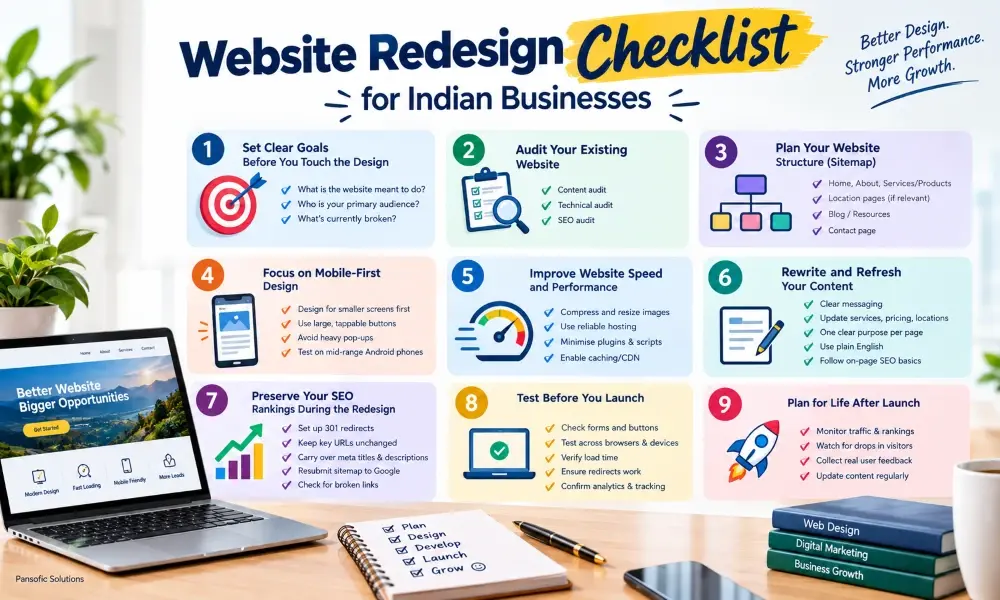
Before any design work begins, it helps to know what "success" looks like for your new website. Redesigns that start with a goal tend to perform far better than ones that start with "let's just make it look nicer."
Writing this down, even briefly, gives your redesign direction and makes it easier to measure results afterward.
A good website redesign checklist always starts with an honest audit of what you already have. This tells you what to keep, what to fix, and what to remove entirely.
This step matters more than people expect. Skipping it is one of the most common reasons a redesign accidentally loses traffic instead of gaining it.
Once you know what you're working with, map out how the new site should be organised. Think of this as the skeleton of your website redesign.
Home page – introduces your business and guides visitors to key pages
About/Company page – builds trust and credibility
Services or Products pages – one clear page per offering, not a single cluttered page
Location pages (if relevant) – useful for businesses serving specific Indian cities or regions
Blog or resources section – supports SEO and answers customer questions
Contact page – simple, visible, and easy to fill out
Keep navigation simple. Visitors and Google should be able to understand your site within a few clicks.
Since service pages usually carry the most weight in turning visitors into enquiries, it's worth getting them right during the redesign see What Should Be on a High-Converting Service Page? for a detailed breakdown.
In India, a large share of website traffic comes from mobile devices, often on varying network speeds. A website redesign that isn't built mobile-first is already behind.
A site that feels smooth on mobile tends to keep visitors around longer that directly affects both conversions and search rankings.
Page speed affects two things that matter most: how visitors experience your site, and how Google ranks it.
Even a 1–2 second improvement in load time can noticeably reduce visitors leaving before the page finishes loading.
Design gets visitors to stay. Content gets them to trust you and take action. Both need attention during a redesign.
Good content isn't about writing more it's about writing clearly enough that visitors don't have to work to understand you.
This is one of the most overlooked parts of any website redesign in India and one of the most damaging when missed.
A redesign should build on your existing SEO progress, not erase it.
Once the new site is ready, resist the urge to launch immediately. A short testing phase saves a lot of trouble later.
A website redesign isn't a one-time event it needs a bit of attention after it goes live too.
Costs vary widely based on the number of pages, custom design work, and functionality needed. A small business site with a handful of pages costs far less than an e-commerce platform with product catalogues, payment integration, and custom features. It's best to get a scoped estimate based on your specific requirements rather than going by a generic figure.
It depends on your budget, timeline, and how complex your site needs to be. DIY builders work well for very simple sites. Freelancers can be cost-effective for straightforward projects. Agencies typically offer more structure, SEO expertise, and post-launch support useful if your website plays a central role in generating business.
A redesign usually keeps your existing platform and content structure while improving design, speed, and usability. A rebuild starts from scratch, often on a new platform or CMS, and is typically needed when the current site has serious technical limitations or can't support your business's growth.
The right platform depends on your business type. WordPress suits content-heavy and service business sites well. Shopify is built for e-commerce. Custom-built platforms make sense for businesses with specific technical needs. A good redesign process includes evaluating whether your current platform still fits your goals.
Document your existing brand elements logo usage, colours, fonts, and tone of voice before design work begins. Share this with your design team as a reference point, so the new site feels like an evolution of your brand rather than a completely different identity.
Rankings and user experience don't always move together. A site can rank reasonably well while still being slow, hard to navigate, or outdated in design. In such cases, a redesign focused on usability and conversions — done carefully to preserve SEO — can improve results without risking existing traffic.
A website redesign doesn't have to be overwhelming. Taken step by step goals, audit, structure, design, content, and SEO preservation it becomes a manageable, worthwhile investment rather than a leap of faith.
If you're unsure where your website currently stands or what a redesign should prioritise, it helps to get a second pair of eyes on it before making any changes.
Get Redesign Audit by Pansofic Solutions


 Seo Admin
Jan 21, 2026
 Seo Admin
Nov 07, 2025
 Seo Admin
Apr 17, 2026
 Seo Admin
Dec 24, 2025
 Seo Admin
Jan 30, 2026